Swagger Parser 2.0 is released. For two years, I worked on it alongside the main 1.x version, which continued to receive features and fixes.
The goal is the same: take an API schema and generate Dart models and clients. Version 2.0 has a new parsing core, more output options, and a web editor. It also removes some features from v1. Here is what changed and how to migrate.
A separate OpenAPI core
Parsing now lives in swagger_parser_core. It reads JSON and YAML, builds
versioned document models, validates the schema, and resolves references.
It supports Swagger 2.0 and OpenAPI 3.0.x, 3.1.x, and 3.2.x.
The models follow the Swagger 2.0, OpenAPI 3.0.4, 3.1.2, and 3.2.1 specifications. This keeps version-specific rules explicit. If you only need to inspect or process a schema, you can use core without the Dart generator.
The project has three library packages:
swagger_parser_core: document models, parsing, validation, and references.swagger_parser: Dart models, HTTP clients, configuration, and CLI.swagger_parser_templates: optional Mustache templates and helper files.
Three HTTP backends and four serializers
You can now choose the HTTP client independently of the model serializer.
| Setting | Options | Default |
|---|---|---|
| HTTP client | Retrofit + Dio, Dio, package:http | Retrofit + Dio |
| Model serializer | Plain JSON, json_serializable, Freezed, dart_mappable | Plain JSON |
Plain models have fromJson and toJson methods with no serializer package.
With standalone Dio or package:http, this also avoids a builder step for the
client. Retrofit and package serializers still use build_runner.
Methods retain request cancellation and per-call options where the transport supports them. Clients handle forms, multipart files, and binary responses. SSE remains supported. JSON Lines and optional byte streams cover record feeds and large downloads.
By default, a method uses the lowest declared exact 2xx status to choose its
return type. Set response_mode: all_statuses to generate typed result variants
for the declared statuses. Application code can then handle those variants
with a Dart switch.
Models that retain schema behavior
The generator handles $ref, allOf, oneOf, and anyOf, including unions
with and without a discriminator. Request and response models split only when
readOnly or writeOnly makes them different.
There are options to preserve unknown enum and discriminator values, apply
custom types and codecs, and generate explicit DTO validators with field paths.
Schema summaries and descriptions become Dartdoc by default. Deprecated
members receive @Deprecated annotations.
For PATCH, optional nullable fields use ordinary T? by default and omit null
values from JSON. Enable use_presence_records when an API must distinguish
an omitted field from an explicit JSON null.
One public import
Clients are grouped by the first operation tag. Operations without tags share a fallback client. Each client has its own folder, with its models beside it. A shared model belongs to the first client that uses it in schema operation order.
For a schema with a Stations tag, the output can look like this:
lib/generated/
  api.dart
  exports.dart
  stations/
    stations_client.dart
    models/
      station.dart
api.dart contains the Api class and exports exports.dart. Importing it
makes the generated clients and models available. Use root_api_class_name
to rename the root class and its entry file.
A new web editor
The web editor is rebuilt with Dart and Jaspr. Paste a schema or load a JSON/YAML file, edit the config through controls or YAML, and download the result as a ZIP. The archive retains the generated folder structure.
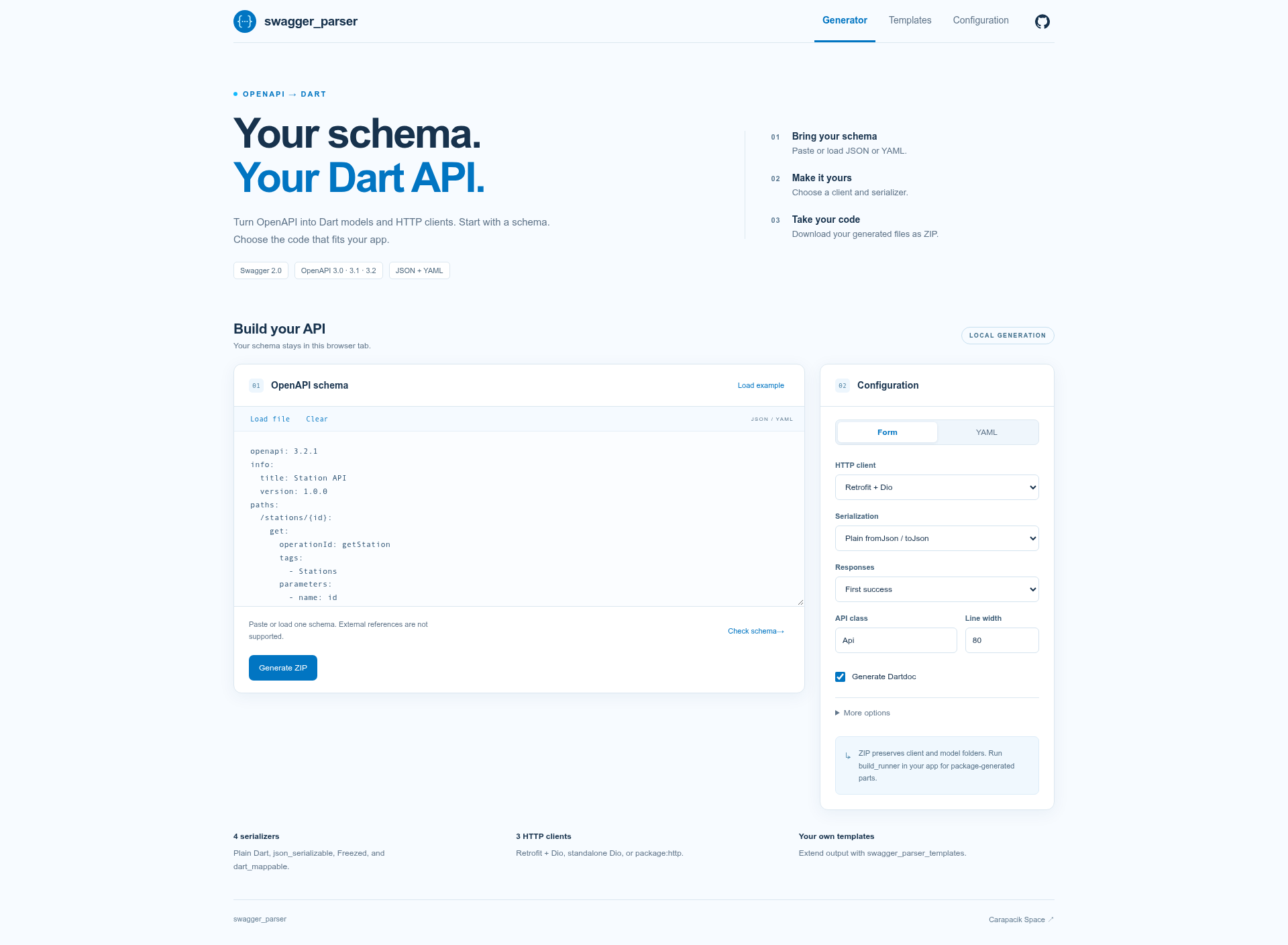
Separate tabs hold the generator, custom templates, and configuration.
Generation runs locally in a browser worker. Pages accepts internal $ref
references; external references remain a CLI and library feature.
Custom templates live in an optional package. They can extend or replace
planned Dart files and add helpers, such as Page<T>. The main package has
no Mustache dependency. Templates change source output after schema resolution
and type mapping; they do not change those stages.
Start with a small config
Version 2.0 requires Dart 3.13 or later within the 3.x series. This minimum supports compatible versions of the code generation and serialization packages and lets the generator use primary constructors in DTOs.
Add the generator to your project:
dev_dependencies:
  swagger_parser: ^2.0.0
Then create swagger_parser.yaml:
swagger_parser:
  schema_path: api/openapi.yaml
  output_directory: lib/generated
  generation:
    http_client: dio
    serializer: plain
Run:
dart pub get
dart run swagger_parser
This example selects standalone Dio with plain models. Add Dio to your app’s
runtime dependencies; the guide lists the supported package versions.
Use http_client: retrofit and run dart run build_runner build if you prefer
Retrofit. Omitting generation selects Retrofit and plain models by default.
The CLI still supports -f, -h, and -o, plus schemas downloaded from URLs.
validate checks a schema, and --check compares generated files without writing.
For several APIs, inputs gives each schema its own settings and output folder.
Input settings override shared fields; lists replace the inherited lists.
What changes when upgrading from v1
The configuration has changed. Use the configuration reference
instead of copying the old config unchanged. New config keys use snake_case.
These features are removed:
- Kotlin generation. The built-in generator now targets Dart.
- Single-file output. Use the generated API entry point to import the output.
- DTOs without serialization. Use custom templates if you need this output.
Custom templates move to swagger_parser_templates and its separate CLI.
Retrofit, Freezed, json_serializable, dart_mappable, and SSE remain available.
Start migration with one schema. Review the generated diff, adjust config and imports, run builders if needed, and test the client against your API. The rewrite is covered by real JSON/YAML fixtures, generated-file checks, and consumer tests that build and run the supported clients and serializers.
Try the web editor, read the 2.0.0 release notes, or visit the repository.